File: /home/hnhtennm/.vscode-server/extensions/shufo.vscode-blade-formatter-0.23.5/README.md
[](https://github.com/shufo/vscode-blade-formatter/actions/workflows/test.yml)
[](https://marketplace.visualstudio.com/items?itemName=shufo.vscode-blade-formatter)
[](https://marketplace.visualstudio.com/items?itemName=shufo.vscode-blade-formatter)
[](https://marketplace.visualstudio.com/items?itemName=shufo.vscode-blade-formatter&ssr=false#version-history)
[](https://marketplace.visualstudio.com/items?itemName=shufo.vscode-blade-formatter&ssr=false#review-details)
# vscode-blade-formatter
An opinionated Blade file formatter for VSCode. Marketplace page is [here](https://marketplace.visualstudio.com/items?itemName=shufo.vscode-blade-formatter).
You can also format programmatically with the same syntax using the [blade-formatter](https://github.com/shufo/blade-formatter) that this extension relies on.
## Features
- Automatically indent markup inside directives
- Automatically add spacing to blade template markers
- PHP 8 support (null safe operator, named arguments) 🐘
- PSR-2 support (format inside directives)
- Automatically sort Tailwind CSS classes with respect of `tailwind.config.js`
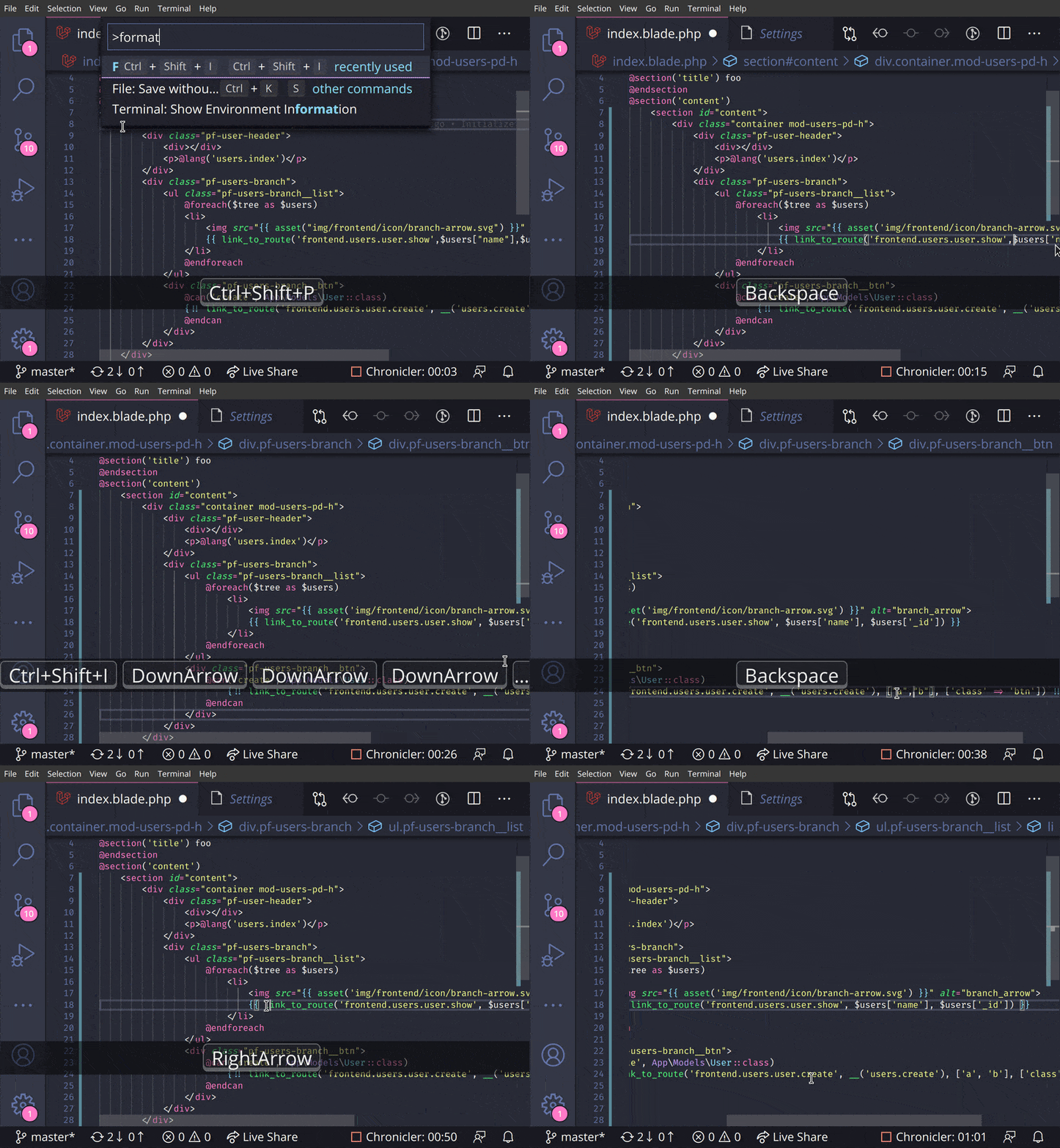
## Screencast
## Extension Settings
| setting | description | default |
| :----------------------------------------------------- | :------------------------------------------------------------------------------------------------------------------------------------------------------------------------------------------------------------------------------------------------------------------------------ | :------ |
| `Blade Formatter: format Enabled` | Whether it enables or not | true |
| `Blade Formatter: format Indent Size` | An indent size | 4 |
| `Blade Formatter: format Wrap Line Length` | The length of line wrap size | 120 |
| `Blade Formatter: format Wrap Attributes` | The way to wrap attributes. `[auto\|force\|force-aligned\|force-expand-multiline\|aligned-multiple\|preserve\|preserve-aligned]` | `auto` |
| `Blade Formatter: format Sort Tailwind Css Classes` | Sort Tailwind CSS classes automatically | false |
| `Blade Formatter: format Sort HTML Attributes` | Sort HTML Attributes in the specified order. [`none` \| `alphabetical` \| [`code-guide`](https://codeguide.co/#attribute-order) \| [`idiomatic`](https://github.com/necolas/idiomatic-html#attribute-order) \| [`vuejs`](https://eslint.vuejs.org/rules/attributes-order.html)] | `none` |
| `Blade Formatter: format Indent Inner Html` | Indent `<head>` and `<body>` sections in html. | false |
| `Blade Formatter: format use Tabs` | Use tab as indentation character | false |
| `Blade Formatter: format Custom Html Attributes Order` | Comma separated custom HTML attributes order. e.g. `id, data-.+, class, name`. To enable this you must specify sort html attributes option as `custom`. You can use regex for attribute names. | `none` |
| `Blade Formatter: format No Multiple Empty Lines` | Collapses multiple blank lines into a single blank line. | false |
| `Blade Formatter: format No PHP Syntax Check` | Disable PHP Syntax check. Enabling this will suppress syntax error reporing. | "" |
| `Blade Formatter: format No Single Quote` | Use double quotes instead of single quotes for php expression. | false |
| `Blade Formatter: Dont Show New Version Message` | If set to 'true', the new version message won't be shown anymore. | false |
## Configuration file: .bladeformatterrc.json or .bladeformatterrc
To configure settings per project, put `.bladeformatterrc.json` or `.bladeformatterrc` to your project root will vscode-blade-formatter treat it as setting files.
Configuration file will like below:
```json
{
"indentSize": 4,
"wrapAttributes": "auto",
"wrapLineLength": 120,
"endWithNewLine": true,
"noMultipleEmptyLines": false,
"useTabs": false,
"sortTailwindcssClasses": true,
"sortHtmlAttributes": "none",
"noPhpSyntaxCheck": false,
"noSingleQuote": false
}
```
## Ignoring Files: .bladeignore
To exclude files from formatting, create a `.bladeignore` file in the root of your project. `.bladeignore` uses [gitignore syntax](https://git-scm.com/docs/gitignore#_pattern_format)
```gitignore
# Ignore email templates
resources/views/email/**
```
## Disabling format in file
To disable formatting in your file, you can use blade comments in the following format:
```blade
{{-- blade-formatter-disable --}}
{{ $foo }}
{{ $bar }}
{{-- blade-formatter-enable --}}
```
To disable formatting on a specific line, you can use comment in the following format:
```blade
{{-- blade-formatter-disable-next-line --}}
{{ $foo }}
```
To disable formatting for an entire file, put a `{{-- blade-formatter-disable --}}` comment at the beginning of the file:
```blade
{{-- blade-formatter-disable --}}
{{ $foo }}
```
## TODO
- [ ] Add more option for HTML formatting rules
- [ ] Add option for PHP formatting rules
- [x] Automate package publishing flow
- [x] Integration test
## Release Notes
see [CHANGELOG.md](https://github.com/shufo/vscode-blade-formatter/blob/master/CHANGELOG.md)
## Related Projects
- [blade-formatter](https://github.com/shufo/blade-formatter) - CLI blade formatter this extension relies on
- [prettier-plugin-blade](https://github.com/shufo/prettier-plugin-blade) - Prettier plugin for Blade
- [coc-blade](https://github.com/yaegassy/coc-blade) - [coc.nvim](https://github.com/neoclide/coc.nvim) Extension by [@yaegassy](https://github.com/yaegassy)
## Contributing
1. Fork it
2. Create your feature branch (`git checkout -b my-new-feature`)
3. Commit your changes (`git commit -am 'Add some feature'`)
4. Push to the branch (`git push origin my-new-feature`)
5. Create new Pull Request
## Development
```bash
$ yarn install
$ cp .env.example .env # set your app insight key
$ yarn run watch # watch changes
```
## Testing
```bash
$ yarn install
$ cp .env.example .env # set your app insight key
$ yarn run compile
$ yarn run test
```
## Sponsors

## Contributors
<!-- readme: collaborators,contributors -start -->
<table>
<tr>
<td align="center">
<a href="https://github.com/shufo">
<img src="https://avatars.githubusercontent.com/u/1641039?v=4" width="100;" alt="shufo"/>
<br />
<sub><b>Shuhei Hayashibara</b></sub>
</a>
</td>
<td align="center">
<a href="https://github.com/slovenianGooner">
<img src="https://avatars.githubusercontent.com/u/1257629?v=4" width="100;" alt="slovenianGooner"/>
<br />
<sub><b>SlovenianGooner</b></sub>
</a>
</td>
<td align="center">
<a href="https://github.com/yaegassy">
<img src="https://avatars.githubusercontent.com/u/188642?v=4" width="100;" alt="yaegassy"/>
<br />
<sub><b>Yaegassy</b></sub>
</a>
</td>
<td align="center">
<a href="https://github.com/notdian">
<img src="https://avatars.githubusercontent.com/u/4225509?v=4" width="100;" alt="notdian"/>
<br />
<sub><b>Null</b></sub>
</a>
</td>
<td align="center">
<a href="https://github.com/1cbyc">
<img src="https://avatars.githubusercontent.com/u/35623334?v=4" width="100;" alt="1cbyc"/>
<br />
<sub><b>Isaac Emmanuel</b></sub>
</a>
</td>
<td align="center">
<a href="https://github.com/j3j5">
<img src="https://avatars.githubusercontent.com/u/1239921?v=4" width="100;" alt="j3j5"/>
<br />
<sub><b>Julio J. Foulquie</b></sub>
</a>
</td></tr>
</table>
<!-- readme: collaborators,contributors -end -->
## LICENSE
MIT
## Data and telemetry
This extension collects usage data and sends it to [Azure Application Insight](https://docs.microsoft.com/en-us/azure/azure-monitor/app/app-insights-overview) to improve extension. This extension respects the `telemetry.enableTelemetry` setting.
To opt out, please set the `telemetry.enableTelemetry` setting to false. Learn more in [FAQ](https://code.visualstudio.com/docs/supporting/faq#_how-to-disable-telemetry-reporting).